
The Local SEO Chrome Extension That Grades Any Page Out of 100
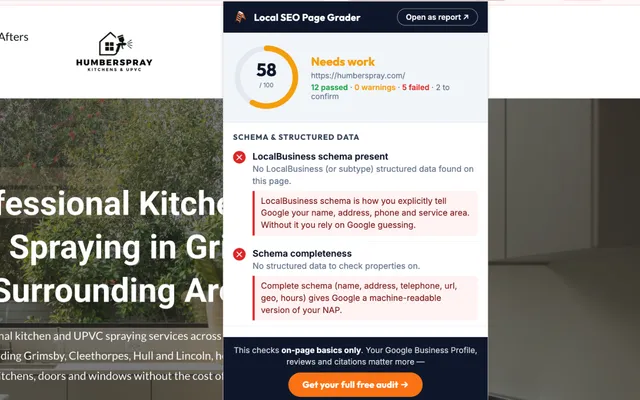
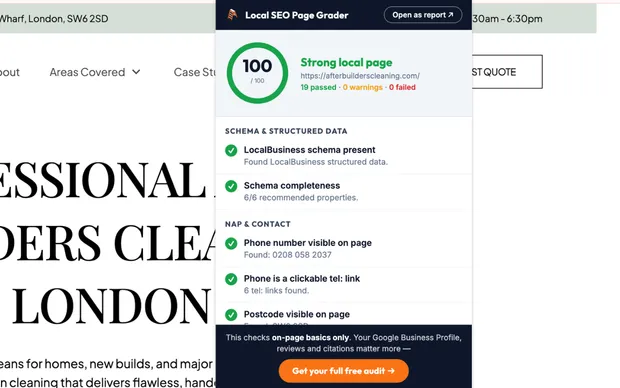
Local SEO Page Grader is a free local SEO Chrome extension built for UK trades and the people who market them. Click the icon on any page and it runs 19 checks, scores the page out of 100, and explains every issue in plain English.
Free • No account • Nothing leaves your browser
5.0 stars on
Trustpilot
5.0 stars on
What the Local SEO Page Grader Checks
The same on-page signals I check at the start of every audit, run in one click. Pass, warning or fail for each, and a one-line reason why it matters when something fails.
Schema and structured data
The heaviest-weighted section. It looks for LocalBusiness markup, including Plumber, Electrician, RoofingContractor and about 140 more subtypes, then checks completeness: name, address, telephone, url, geo coordinates and opening hours. Generic Organisation markup gets flagged, because it tells Google you exist without telling Google where you work.
NAP and contact
Phone number visible on the page, wrapped in a clickable tel: link, UK postcode shown, address properly marked up. Most local searches happen on a phone. A number that can't be tapped costs you calls.
Local relevance
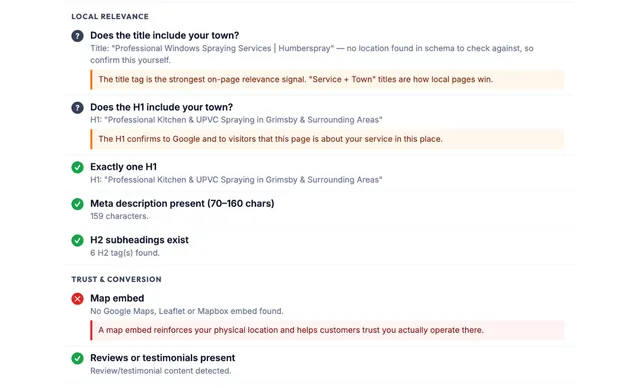
Whether your title tag and H1 contain your town (verified automatically against your schema where possible), exactly one H1, a meta description between 70 and 160 characters, and H2 subheadings on the page.
Trust and conversion
A map embed (Google Maps, Leaflet or Mapbox all count), reviews or testimonials somewhere on the page, and opening hours a customer can actually find.
Technical
The big one first: whether the page is accidentally set to noindex and invisible to Google. Then HTTPS, a mobile viewport tag, image alt text coverage and a canonical tag.
See your own score
Install it, open your homepage, click the icon. It takes less than a minute to find out where you stand.
Add to ChromeA plain-English reason behind every failed check
No jargon dumps. Each failed check comes with one line on why it matters: what Google reads from it, or what a customer does when it's missing. You always know what to fix first and why it's worth the effort.
It catches the mistakes that keep local pages invisible
Missing LocalBusiness schema. A phone number that isn't tappable. A title tag without the town. A page quietly set to noindex. The scan surfaces the failures at the top in red, so the leak in your local relevance is impossible to miss.
Open any scan as a full report
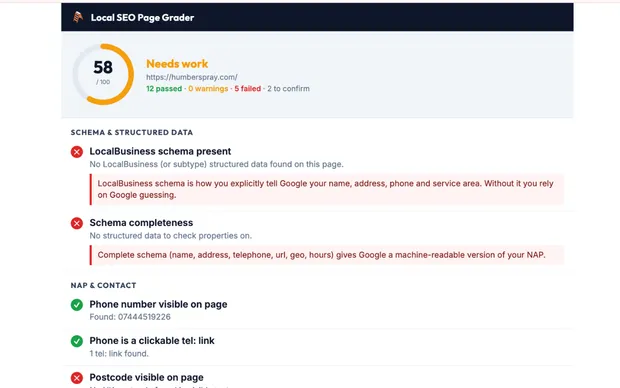
One click turns the popup into a full-tab report. It survives the popup closing, which makes it the version to use on a screen-share, and it prints cleanly to PDF if you need to send the results to a client or your web designer.
From Install to First Score in Under a Minute
- 1
Add it to Chrome and pin it
One click from the Chrome Web Store. No sign-up, no settings.
- 2
Open a page and click the icon
Your homepage, a service page, or the three competitors sitting above you in the map pack. The scan runs on whatever page you're looking at.
- 3
Fix the fails, then re-scan
Work through the failed checks, starting with schema. Re-scan after each fix and watch the score climb.
Why I Built a Local SEO Chrome Extension
Every website teardown I record starts with the same five minutes of checks. Is there LocalBusiness schema? Is the phone number tappable? Is the town in the title tag? Is the page even indexable? After the fiftieth teardown I wanted that first pass to take ten seconds, and I wanted any tradesperson to be able to run it without me.
I should be straight about what it can't do. The extension reads the page in front of you and nothing else. It can't see your Google Business Profile, your reviews or your citations, and those move local rankings more than any on-page fix. It also doesn't crawl your site or measure page speed.
So treat the score the way I do: as the first gate. If your page fails the basics, fix those before spending a penny on anything else. If it passes and the phone still isn't ringing, the problem lives off the page, and that's exactly what my free video teardown looks at.
Private by Design
The extension collects nothing and transmits nothing. It has no accounts, no analytics and no remote servers. It requests access to the active tab only, only when you click the icon, and the page content it reads never leaves your device. The full privacy policy is short because there's nothing to hide.
Local SEO Page Grader FAQs
Is the extension actually free?
Yes. No account, no trial, no paid tier. It's the same first-pass check I run at the start of every audit, packaged so anyone can run it in ten seconds, and it stays free.
What does the score out of 100 mean?
Each of the 19 checks carries a weight, with schema weighted heaviest. A pass earns the full weight, a warning earns half, a fail earns nothing, and the score is what you earned as a percentage of what was possible. 100 means every automated check passed. That doesn't mean page one; it means your on-page basics aren't what's holding you back.
Does it work on any website?
Any normal web page, including your competitors'. Chrome blocks all extensions on chrome:// pages, the Chrome Web Store and its PDF viewer. On heavily lazy-loaded site builders like Wix and Elementor, scroll to the bottom of the page first so everything has loaded, then re-scan.
Does it collect any data?
No. The extension has no analytics, no tracking, no accounts and no remote servers. It reads the page you are on, only when you click the icon, analyses it on your device and discards it. The privacy policy is one paragraph because there is nothing to disclose.
Will a score of 100 get me to the top of Google?
On its own, no. On-page signals are one part of local rankings, and your Google Business Profile, reviews and citations carry more weight. The extension tells you whether your page is helping or hurting. If the page passes and the phone still isn't ringing, the free rank check covers the rest.
Why does it flag my schema when I already have Organisation markup?
Because Organisation markup tells Google you exist, while LocalBusiness markup tells Google where you work, what you do and when you're open, in a machine-readable format. For a local business, generic Organisation markup wastes the strongest structured signal you have.
Changelog
First public release. 19 checks across five categories, weighted scoring out of 100, plain-English explanations and the full-tab report mode.
Grade Your Website in the Next 60 Seconds
Install the extension, open your homepage and click the icon. If the score surprises you, the fixes are listed right underneath it.